
Fraxity.ai
B2B website for fractional marketing and sales services, with distinct service, problem, insight, and contact paths.
I’m Tomas Marek, a Webflow Certified Partner. I turn your approved Figma design into a responsive, editable Webflow website, with CMS, launch QA, and handoff agreed in the scope. Work directly with me as a freelance developer for your business or agency team. Projects start at $2,400 after file review.

Bring an approved design and a page list. I review what is ready, identify the missing decisions, and confirm the build, price, and delivery plan before development starts.
I check page count, responsive states, components, assets, interactions, forms, and CMS requirements before confirming scope.
The design is implemented with reusable classes, optimized assets, mobile breakpoints, and Webflow structures that are easy to edit.
Before handoff, I check forms, links, metadata, redirects, image behavior, responsive views, and Webflow publishing details.
Figma to Webflow conversion starts at $2,400 after file review. Final scope depends on page count, CMS, responsive states, forms, integrations, and launch requirements.
Explore published Webflow work and the Fraxity project profile to see the page structure and content paths behind a finished site.
B2B website for fractional marketing and sales services, with distinct service, problem, insight, and contact paths.

Healthcare website with clear service structure, responsive pages, and production launch requirements.
View live Webflow build
Event platform website with product, use-case, resource, and multilingual content paths.
View live Webflow build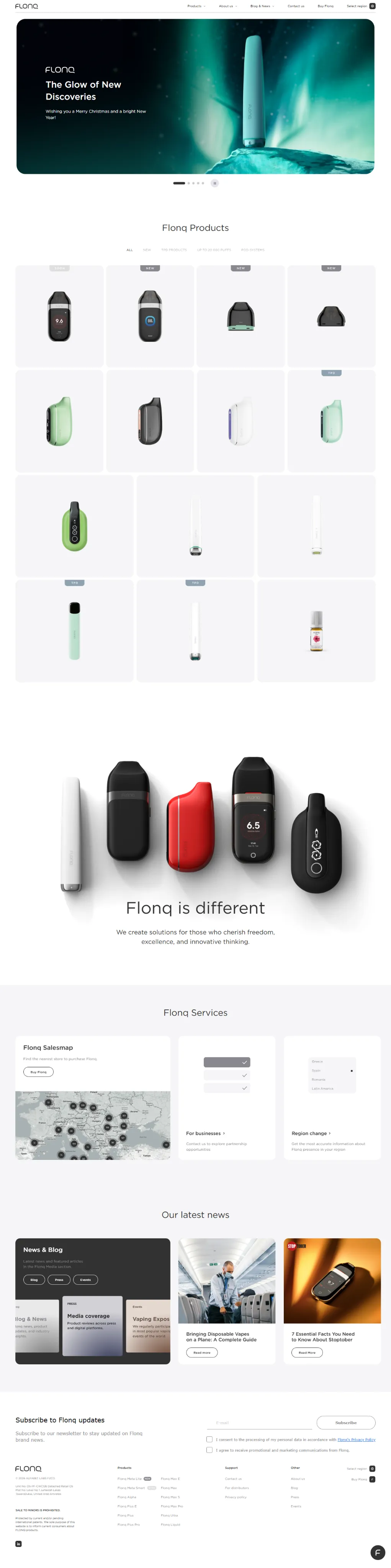
Product website with brand, product, technology, and market paths in a responsive Webflow build.
View live Webflow build“Tomas has handled two of my projects, and both times he delivered far beyond the brief. His eye for detail, paired with calm patience, made every step a breeze.”
“Working with Tomas was effortless. He welcomed every round of feedback and was always up for a quick call to iron out the finer points.”
Keep your design direction and bring me in for implementation. We can agree on the class system, review process, workspace, and handoff before the first page is built. You have a direct point of contact for the Webflow development.
A Figma link is the starting point. Include the page list, CMS needs, integrations, and target launch date so I can separate the confirmed work from open decisions. If you are building it yourself, use the Figma to Webflow workflow and launch checklist or compare free converter options and their limits.
Share the Figma file, page list, fonts, assets, and available mobile layouts. Flag unfinished copy and missing states so they can be resolved during scoping.
List repeatable content such as articles or case studies, form destinations, integrations, animations, and any existing URLs that need redirects.
Include the desired launch date, who reviews the build, and whose Webflow workspace will hold the site. I confirm the delivery plan and handoff requirements after review.
I audit the Figma file first, confirm the project scope, then rebuild the approved design in Webflow with responsive classes, CMS or integrations, SEO metadata, QA, launch checks, and a practical handoff.
I inspect layout states, assets, components, fonts, interactions, forms, and missing mobile or tablet decisions.
The site is built section by section with responsive behavior, reusable classes, CMS fields, and clean page structure.
The final pass checks browser behavior, mobile views, forms, SEO fields, sitemap inclusion, and editing instructions.
The handoff is designed for teams that need to publish, edit, and extend the Webflow site without breaking the structure that was built from the Figma file.
CMS fields, reusable sections, and component rules are kept clear so your team knows what can be edited safely after launch.
Forms, integrations, responsive states, metadata, accessibility basics, canonical URLs, sitemap inclusion, redirects, and analytics are checked before release.
Reusable components and documented editing boundaries give your team a basis for adding pages, changing copy, and maintaining CMS content after handoff.
Practical answers about hiring, project scope, pricing, responsive decisions, and ownership.
Yes. I work directly with businesses, designers, and agency teams. For an agency project, we agree on the existing design system, review process, workspace, and handoff responsibilities before development.
Projects start at $2,400 for a fixed-scope build after file review. The final price depends on page count, responsive states, CMS, forms, integrations, and launch requirements.
Send a Figma link, page list, available responsive layouts, content and assets, CMS requirements, integrations, and desired launch date. I review these before confirming the scope and delivery plan.
Yes. Missing tablet and mobile behavior needs to be agreed during scoping. I check how navigation, columns, images, and long content should adapt, then test the implementation across screen widths.
Yes. I can review the current Webflow project, identify layout, class, CMS, or functionality issues, and scope the parts that need work. Existing usable structure can stay in place.
The agreed scope can include CMS collections and templates, forms, integrations, page titles and descriptions, canonical URLs, redirects, and a sitemap. Launch QA checks the implemented features and responsive behavior.
The site can be built in or transferred to your Webflow workspace, as agreed before development. Handoff includes guidance on the page structure, CMS editing, and reusable components your team will maintain.
The delivery plan depends on the number of unique pages, content readiness, responsive states, CMS, integrations, and review cycles. I confirm timing after reviewing the file and launch requirements.
Yes. The official Figma to Webflow plugin supports design-system sync and copying prepared layouts. My workflow guide explains the transfer steps and checks needed before launch; the development service is for teams that want me to handle the implementation.
Choose a practical guide for your own build, compare transfer tools, or explore the wider Webflow development service.
Follow sync and copy/paste steps, try the responsive layout example, and use the downloadable launch checklist.
Figma to Webflow workflow guideCompare the official plugin and named alternatives by documented free limits, supported transfers, and availability.
Figma to Webflow converter comparisonBuild and launch a fast Webflow website with CMS setup, responsive implementation, on-page SEO basics, and QA.
Webflow development servicesSend the file link, page list, desired launch date, and any CMS or integration requirements. I will review the scope and reply with next steps.
